How to Use AI Tools inside Obsidian
Premium Models from ChatGPT Plus, Gemini Pro, Claude, Perplexity Pro, Midjourney, X/Ai, Deepseek R1 (USA Hosted), Flux Pro + much more

Getting Started
When you sign up for Obsidian AI Tools you’ll receieve a welcome email from [email protected] with your username and password.
You can use this password to log in. To reset your password, you may change it here https://chat.obsidianaitools.com/password by selecting “forgot password” and entering your email address.
If you’re having trouble setting up the Obsidian AI Tools inside of Obsidian you can use the tools in your web browser by visiting https://chat.obsidianaitools.com/
Your underlying service is hosted with Ultimate AI and you have full access to all the premium api models here.
If you have any questions or queries about your service please email Tim at [email protected] who can clarify any techinical questions about the API service.
AI Tools inside Obsidian
Install via BRAT (Recommended)
1. Install the BRAT plugin from the Community Plugins browser
2. In Obsidian Settings, go to Community Plugins > BRAT > Add Beta Plugin
3. Paste the repo below
https://github.com/UltimateAI-org/aitoolsforobsidian
4. BRAT will download the latest release and keep it auto-updated
5. Enable AI Tools from the plugin list
6. The onboarding wizard will guide you through the rest of the setup on first launch
See video below for comparison against other AI Tools
AI Tools inside Obsidian with Claude Code
Note: Coding is permitted using the MiniMax models, the MiniMax-M2.5 model is exceeds Opus on some metrics and either equal or just behind on others. While significantly out performing OpenAI’s Codex.
API Aggregation Service
While Chat is one of the best interfaces out there with higher upload limits than ChatGPT Plus, your subscription with me includes self-service access to an API aggregation service.
That means you can use the API Aggregation service with any application that supports OpenAI compatible APIs. All models from Chat are available in OpenAI compatible format for use in 3rd party applications.
If you have any issues using the https://chat.obsidianaitools.com/v1 API service please reach out to me at [email protected]. and mention the name of the Obsidian community plugin.
AI models
Last updated 12th September 2026- chatgpt-latest
- gpt-5.4
- gpt-5.4-mini
- gpt-5.5
- gpt-5.5-mini
- gpt-5.6-luna
- gpt-5.6-sol
- gpt-5.6-terra
- gpt-6-astra
- Claude 4.5 Haiku
- Claude 4.6 Sonnet
- Claude 4.7 Opus
- claude-latest
- claude-opus-4-8
- claude-sonnet-5
- grok-4.5
- grok-4.6
- grok-latest
- glm-5.2
- glm-5.3
- glm-5.3-flash
- glm-latest
- kimi-k3
- MiniMax-M2.1
- MiniMax-M2.5
- MiniMax-M2.7
- MiniMax-M3
- qwen3.6
- qwen3.7
- qwen3.8
- auto
- task
- MorningBean.AI
- Obsidian Markdown Assistant
- obsidian-latest
Obsidian Web Clipper
Highlight and capture web pages in your favorite browser right into Obsidian using a template of your choice. Save anything and everything with just one click. AI Tools can be used as your AI Interpretor.
- Download and install the Obsidian Web Clipper Extension – https://obsidian.md/clipper
- Open Web Clipper Settings, select the Interpreter tab
- Navigate to https://chat.obsidianaitools.com settings, inside your account you’ll find your API Key


Adding AI Tools to Web Clipper Settings
01) Set Provider Name as Obsidian AI Tools
02) Add Base URL https://chat.obsidianaitools.com/v1/chat/completions
03) Add your API key from https://chat.obsidianaitools.com settings
04) Save and start adding your models, full list can be found at https://obsidianaitools.com/premium-models/
– for an new model request please contact [email protected]

Retrieval-Augmented Generation (RAG)
Retrieval-Augmented Generation (RAG) is a technique that enhances Large Language Models (LLMs) by allowing them to access and incorporate external knowledge bases, improving the relevance and accuracy of their outputs.
If you’re using RAG inside Obsidian with CoPilot, Smart Second Brain or similar then you can use the Open AI Embedding Model below.
Base_URL: https://chat.obsidianaitools.com/v1
Format: OpenRouter
API Key: Obtain this from https://chat.obsidianaitools.com,
Settings -> Account -> api keys
Open AI Embedding Model:
text-embedding-3-small
IMPORTANT: Embedding Exposed your Private Data to Open AI.
For more information please watch https://www.youtube.com/watch?v=e_CCEAiGJpA

CoPilot API Example
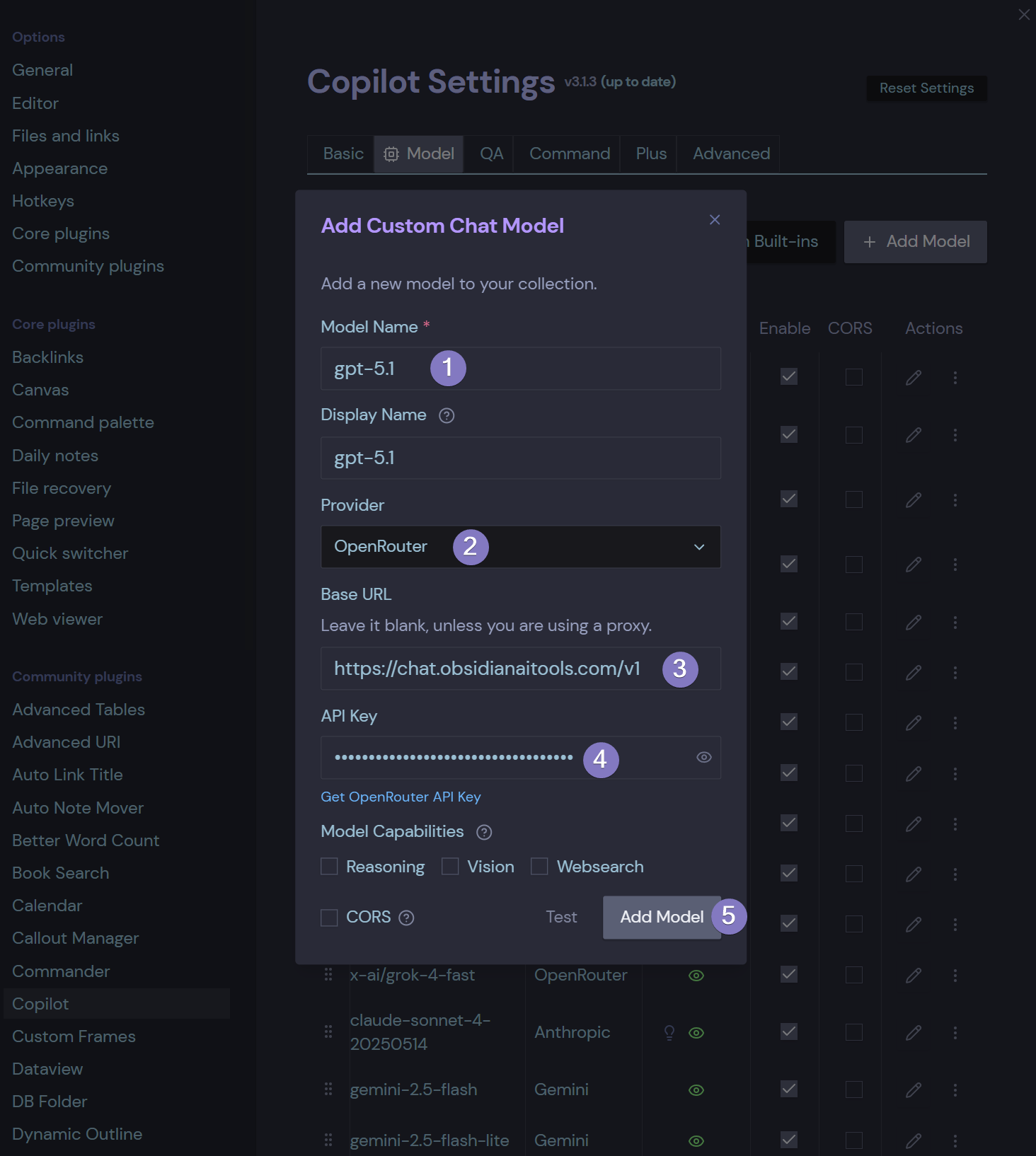
Obsidian CoPilot Plugin
Use your API Aggregation Service in Community Plugins like CoPilot.
- Add your model
- Choose “OpenRouter”
- Add the base api url “https://chat.obsidianaitools.com/v1”
- Add your API Key (from your account)
- Verify then Add Model
- Enjoy CoPilot

Obsidian CoPilot Plugin
Use your API Aggregation Service in Community Plugins like CoPilot.
Web Viewer Core Plugin
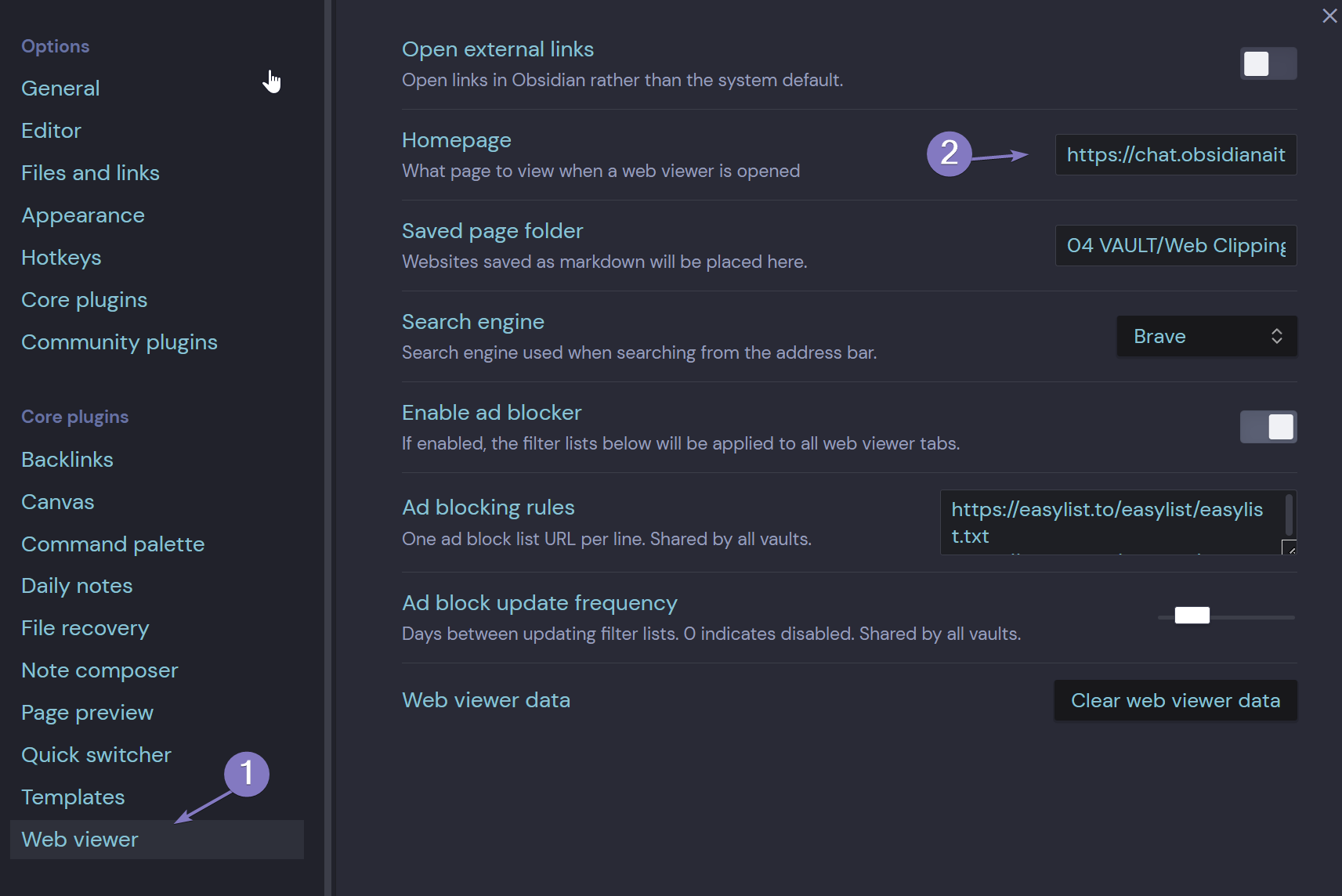
Note: Obsidian Web Viewer is a Core Plugin, you can set your Obsidian AI Tools as the default Homepage in Web Viewer Core Plugin setting – add https://chat.obsidianaitools.com
01) Navigate to Settings > Core Plugins > Enable Web Viewer
02) Select Web Viewer and set https://chat.obsidianaitools.com as your homepage
03) To launch CTRL + P then type in Web Viewer > Search the Web or Open web viewer

You must have a valid subscription. If you haven’t signed up yet please click the button below otherwise you’re ready to level up your Obsidian experience.